35 Make a first 3D picture
This is an optional route through the Guide. You need only the Visual, Scene, position, and Pict from Quick Start: a moving circle. You do not need the slide chapters to make a 3D animation. Continue to Animate a 3D object and its camera after this chapter, or skip this route when your video is entirely 2D.
The examples below are evaluated while the manual is built. The hidden documentation setup explicitly selects Animate’s software 3D renderer, so the Guide does not require an OpenGL context.
35.1 Make an object
A spatial Visual describes a 3D object. A box, sphere, curve, or surface can be a spatial Visual. Unlike an ordinary 2D Visual, it does not go directly into scene-add. We will put it inside a view first.
A 3D point has three coordinates: (vec3 x y z). They describe the object’s position in space, not a position in the output image. The axes are right-handed. Before moving the camera, think of positive x as right, positive y as up, and positive z as toward you. A different camera changes how those axes look on screen; it does not change the coordinates.
box3d takes width, height, and depth. Its centre is initially the origin. A material chooses the surface’s appearance. We use a blue material and 'flat shading so the box’s flat faces are easy to distinguish. We do not need individual lights yet: the view has a default light setup.
(define brick (box3d 5/2 3/2 1 #:id 'brick #:material (material3d #:color "cornflowerblue" #:shading 'flat)))
The ID 'brick names this object. It does not name a picture or a file. Other solid constructors include cube3d and sphere3d. See the 3D reference map for their options and more kinds of objects.
35.2 Choose where to look from
A 3D camera chooses a viewpoint and where it looks. A perspective camera makes more distant objects look smaller. origin3 is the point (vec3 0 0 0). The following camera is above and to one side of the box, looking toward that origin:
(define viewpoint (perspective-camera3d #:position (vec3 3 2 5) #:look-at origin3))
Do not confuse this with the ordinary 2D camera. The 3D camera looks at the box. The ordinary camera chooses which part of the surrounding 2D Scene becomes the output image. For now we leave that ordinary camera unchanged.
35.3 Put the object inside a view
A view3d is a rectangular window onto a list of spatial Visuals. The window itself is an ordinary 2D Visual. Its width and height are measured in the same 2D world units as the circle in the Quick Start, not in 3D object units or output pixels.
'opaque draws filled faces. The default, 'wireframe, draws edges. The name 'opaque does not mean the whole 3D system lacks transparency; it selects the filled-surface rendering path.
(define model (view3d (list brick) #:id 'model #:width 10 #:height 45/8 #:camera viewpoint #:render-mode 'opaque #:background "aliceblue"))
The box is 'brick; the window is 'model. We give them separate names because later we will move them separately.
35.4 Use an ordinary Scene
There is no second 3D timeline to learn. Add the view to a Scene just as you added the circle in the Quick Start:
(define still (scene-add (make-scene) model))
The Scene still has duration zero:
> (scene-duration still) 0
Scene |
model ordinary 2D view |
camera viewpoint used inside the view |
brick spatial Visual |
The camera is a setting on the view, not another child beside the box. A view can contain several spatial objects; this example needs only one.
35.5 Ask for a picture
Because view3d is an ordinary Visual, the same scene->pict operation used earlier can draw the Scene. The expression shown below is what you write; the documentation build evaluates it with the software 3D renderer and adds only page scaling and a one-pixel frame:
> (scene->pict still 0)
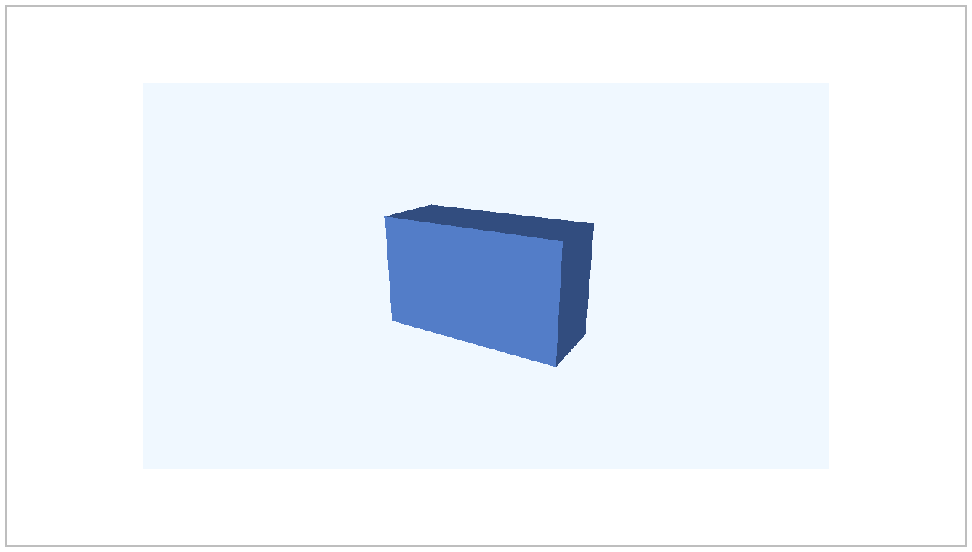
 t = 0 s
A still picture, sampled at time zero.
The complete standalone program is "scribblings/examples/first-spatial-picture.rkt". Merely requiring that example does not open a window, render a movie, or run an encoder. Rendering happens only when a picture or output frame is requested.
Next, Animate a 3D object and its camera gives this same Scene a duration.