12 Draw plots while moving the camera
This is an advanced recipe, not a first example. It builds a Scene in executable steps, checks its duration, and deliberately does not write PNG or MP4 files while the manual is being built.
12.1 Build the plotted Visuals
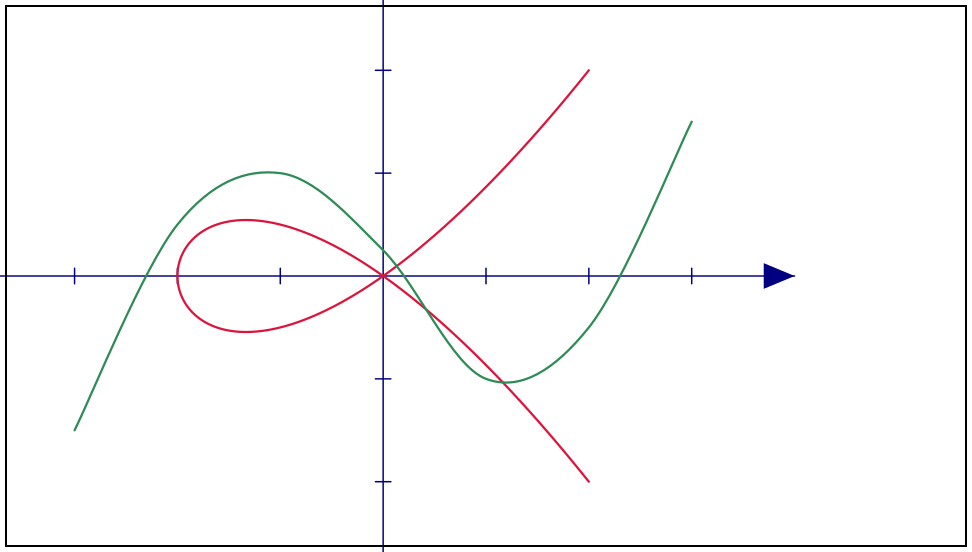
(define coordinate-axes (axes #:id 'coordinate-axes #:x-range (axis-range -4 4 1) #:y-range (axis-range -3 3 1) #:x-length 8 #:y-length 6 #:stroke "navy")) (define loop-curve (parametric-curve coordinate-axes (lambda (parameter) (define x (- (* parameter parameter) 2)) (vec2 x (/ (* parameter x) 2))) #:id 'loop-curve #:parameter-range (parameter-range -2 2) #:sample-count 181 #:interpolation 'smooth #:stroke "crimson")) (define observations (data-plot coordinate-axes (list (vec2 -3 -3/2) (vec2 -2 1/2) (vec2 -1 1) (vec2 0 1/4) (vec2 1 -1) (vec2 2 -1/2) (vec2 3 3/2)) #:id 'observations #:interpolation 'smooth #:stroke "seagreen"))
parametric-curve calls its procedure while constructing the Visual. The resulting path stores immutable geometry, not the sampling procedure.
12.2 Animate the plots and camera together
(define initial-camera (make-camera #:world-width 14 #:center origin)) (define animation (scene-wait (scene-play (make-scene #:camera initial-camera) (fade-in coordinate-axes) (create loop-curve) (create observations) (camera-pan-to (vec2 1 0)) (camera-zoom-by 3/2) #:duration 2) 1/2))
At two seconds the paths have been created and the camera has reached its new position and zoom:
> (scene->pict animation 2)
> (scene-duration animation) 5/2
The camera center and visible width are sampled from the same Scene clip as the Visual animations.
12.3 Render explicitly
Media output is effectful, so the manual shows these calls but substitutes (void) during documentation evaluation. This is the same show-one-form/evaluate-another technique used in the Racket manuals for environment-dependent examples.
(eval:alts (render-frames! animation "frames" #:fps 30) (void)) (eval:alts (encode-mp4! "frames" "animation.mp4" #:fps 30) (void))
Run those displayed forms yourself when you want files. The MP4 step requires FFmpeg.