48 Semantic matching of named parts
Two words keep their identities while their positions change. A question fades out and a conclusion fades in. The panel itself also moves to make room for explanatory text. This example uses ordinary text; it needs no formula typesetter.
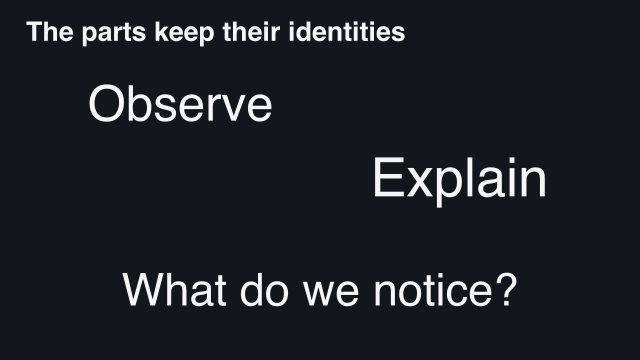 2 s — first arrangement
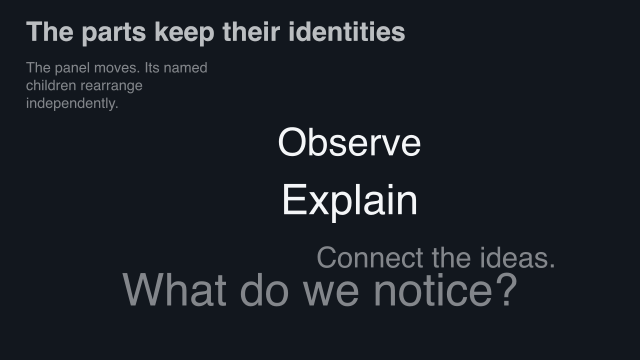 3.25 s — halfway
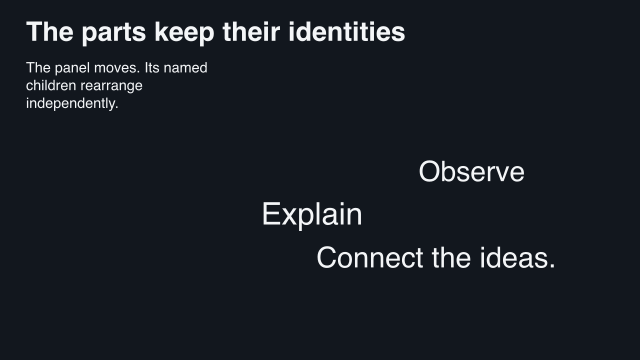 4.5 s — second arrangement
Reviewed semantic-parts gallery captures. Named children retain their identities as the panel changes layout.
48.1 Complete source
scribblings/examples/matched-parts.rkt
#lang racket/base (require animate/slides) (provide make-idea-panel before after film) ;; The words are ordinary text, but their correspondence comes from names. ;; Reordering the declaration list does not change those identities. ;; doc: parts begin (define (make-idea-panel final?) (define row (semantic-group #:width 10 #:height 3 (semantic-part 'observe "Observe" #:x (if final? 6 0) #:y 0 #:width 4 #:height 1.2) (semantic-part 'explain "Explain" #:x (if final? 0 6) #:y 1.6 #:width 4 #:height 1.2))) (semantic-group #:width 12 #:height 6 (semantic-part 'ideas row #:x (if final? 0 1) #:y (if final? 1.4 0.4) #:width (if final? 9 10) #:height 3) (semantic-part (if final? 'conclusion 'question) (if final? "Connect the ideas." "What do we notice?") #:x 1 #:y 4.5 #:width 10 #:height 1))) ;; doc: parts end ;; doc: slides begin (define before (slide #:layout 'title+figure [title "The parts keep their identities"] [figure #:key 'ideas (make-idea-panel #f)])) (define after (slide #:layout 'title+figure [title "The parts keep their identities"] [body "The panel moves. Its named children rearrange independently."] [figure #:key 'ideas (make-idea-panel #t)])) ;; doc: slides end ;; doc: match begin (define film (storyboard #:id 'manual-parts #:theme lecture-dark (storyboard-shot 'before (hold-slide before #:duration 2)) (slide-transition #:effect 'match #:keys '(ideas) #:depth 'semantic #:duration 2.5 #:easing 'smooth) (storyboard-shot 'after (hold-slide after #:duration 3)))) ;; doc: match end
48.2 How the program is organized
make-idea-panel builds either arrangement from one function. The 'observe and 'explain names remain the same on both sides. The question and conclusion deliberately have different names, because one leaves while the other enters.
The outer 'ideas key connects the figure slots. Within the connected figures, #:depth 'semantic asks the transition to preserve the named children. Their rectangles use a top-left origin: x goes right and y goes down. Those are not the centred world coordinates used for ordinary Scene placement.
The movie holds for two seconds, transitions for 2.5, then holds for three. Names establish correspondence; the declaration order and similar-looking words do not replace those names.
48.3 Render the movie
racket slides/render-example.rkt --workers 10 \ |
--output slides-output/complete-examples/semantic-parts \ |
scribblings/examples/matched-parts.rkt |
48.4 Try one change
Move a child to another rectangle while keeping its name. Then try changing the name as well: that describes a different child, so it should enter or leave instead of being retained. Use this distinction deliberately when explaining whether an idea continues or is replaced.
See Name the parts you want to follow and Named children and frozen checkpoints.