47 A geometry construction lesson
This program places the library’s equilateral-triangle construction in a slide. The construction controls its points, circles, lines, and labels. The slide provides the heading, narration timing, and a final hold.
 0 s — before the reveal
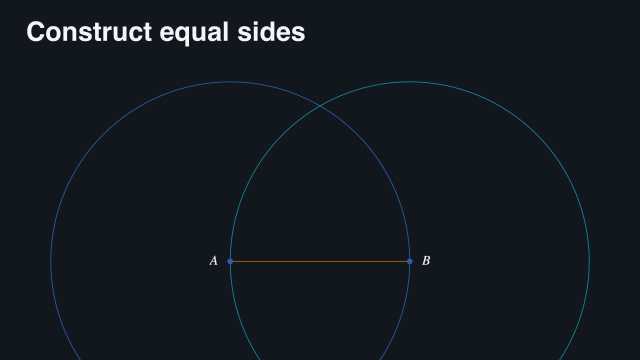 10.55 s — construction in progress
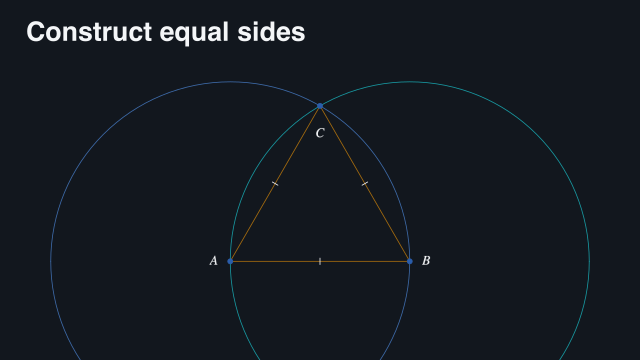 23.1 s — completed and held
Reviewed geometry-construction gallery captures of the construction used by this program.
47.1 Complete source
scribblings/examples/geometry-slide.rkt
#lang racket/base (require animate/slides animate/slides/geometry (only-in animate/geometry/examples/equilateral-triangle equilateral-triangle)) (provide card clip film) ;; doc: content begin (define card (slide #:layout 'title+figure [title "Construct equal sides"] [figure (geometry-content equilateral-triangle)])) ;; doc: content end ;; doc: play begin (define clip (build-slide card (beat 'construct #:narration (narration "Construct an equilateral triangle with two circles." #:draft-duration 4) (play-content 'figure)) (beat 'hold #:duration 2))) ;; doc: play end (define film (storyboard #:id 'manual-geometry #:theme lecture-dark (storyboard-shot 'geometry-construction clip)))
The construction itself is an imported library example, "geometry/examples/equilateral-triangle.rkt". This is a complete slide program that uses that construction; it does not duplicate the construction’s implementation.
47.2 How the program is organized
geometry-content adapts the construction for the figure slot. play-content advances its local clock. Making the slot visible on its own would not start the construction.
The narration is a silent four-second draft: it supplies words and pacing, not a generated voice. The construction beat has no explicit duration, so preparation allows enough time for both the draft and the figure’s playback. The final beat holds the completed construction for another two seconds.
47.3 Render the movie
racket slides/render-example.rkt --workers 10 \ |
--output slides-output/complete-examples/geometry-construction \ |
scribblings/examples/geometry-slide.rkt |
The existing slide runner prepares the domain content before it gives frame work to subprocesses. There is no separate geometry-specific movie renderer to learn for this example.
47.4 Try one change
Replace the draft narration with your own explanation, or substitute another exported construction program. Keep the playback action and check the resulting beat duration rather than assuming every construction takes four seconds.
See Reuse a geometry construction, Start its own clock, and Pace a lesson with narration.