Rhombus
|
class gui.ListChoice(): | implements WindowChildView | constructor ( | choices :: ObsOrValue.of(List), | ~choice_to_label: choice_to_label :: Any -> Any = values, | ~choice_equal: choice_equal :: Function.of_arity(2) = (_ == _), | ~selection: selection :: ObsOrValue.of(Any) = #false, | ~action: action :: Any -> ~any = values, | ~label: label :: ObsOrValue.of(maybe(View.LabelString)) = #false, | ~style: style :: List.of(ListChoice.StyleSymbol) = [], | ~font : font :: draw.Font = View.normal_control_font, | ~margin: margin :: ObsOrValue.of(View.Margin) = [2, 2], | ~min_size: min_size :: ObsOrValue.of(Size) = [#false, #false], | ~stretch: stretch :: ObsOrValue.of(Stretch) = [#true, #true], | ~enable: enable :: ObsOrValue.of(Boolean) = #true, | ~window_callbacks: window_callbacks :: maybe(WindowCallbacks) = #false | ) |
|
|
|
|
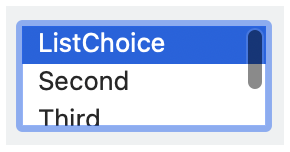
Like
gui.Choice, but presented as a list box instead of a
popup menu. The
ListChoice view is a simplified version of
the
Table view.
See View.LabelString for information about keyboard
mnemonics in label or the labels produced by
choice_to_label.
See Geometry Management for information about ~margin,
~min_size, and ~stretch.
The ~window_callbacks argument configures
callbacks that are common to all WindowChildViews.
See WindowCallbacks for more information.
A list choice style option:
#'horizontal_label: When the list-choice control has a
label, show it to the left of the control. Horizontal label placement is
the default if #'vertical_label is not specified, and
#'horizontal_label and #'vertical_label are mutually
exclusive.
#'vertical_label: When the list-choice control has a
label, show it above the control.