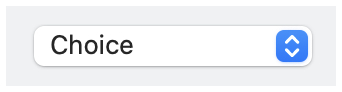
class | ||||||||||||||||
| ||||||||||||||||
| ||||||||||||||||
property | ||||||||||||||||
The function call action(now_selected) is performed when the selection is changed by a user, where now_selected indicates the newly selected choice.
The Choice.at_selection property returns an observable that is updated whenever the choice popup’s state changes through an action (as also reported via action) or via selection as an observable.
The ~choice_to_label function converts an item in choices to a label to be shown for the control, and the ~choice_equal argument defines equality for choice identities. By default, choices is expected to be a list of View.LabelString, since choice_to_label is the identity function.
See View.LabelString for information about keyboard mnemonics in label.
See Geometry Management for information about ~margin, ~min_size, and ~stretch.
The ~window_callbacks argument configures callbacks that are common to all WindowChildViews. See WindowCallbacks for more information.
enumeration | |||
|
#'horizontal_label: When the choice control has a label, show it to the left of the control. Horizontal label placement is the default if #'vertical_label is not specified, and #'horizontal_label and #'vertical_label are mutually exclusive.
#'vertical_label: When the choice control has a label, show it above the control.