5 Colors and Themes
Animate distinguishes a literal color from a semantic color. A literal is a fixed visual promise: use it for a logo, a calibration primary, or a supplied brand asset. A palette token names a reviewed swatch, and a role token names a purpose such as foreground text, a grid, or a surface. Tokens resolve only when a renderer receives an explicit immutable theme.
There is no process-wide current theme. The same unchanged Scene can therefore be rendered under two themes without changing its geometry, timing, source paths, or animation requests.
(require animate animate/colors) (define brand-blue (rgb-color 34 84 190)) (define card (rectangle #:id 'card #:width 6 #:height 2 #:fill theme-surface #:stroke theme-surface-edge)) (define caption (plain-text "Theme-aware card" #:id 'caption #:center (vec2 1/3 0) #:color theme-foreground)) (define logo-mark (circle #:id 'logo #:center (vec2 -5/2 0) #:radius 1/5 #:fill brand-blue #:stroke brand-blue)) (define scene (scene-wait (scene-add (make-scene) card caption logo-mark) 1)) (resolve-color theme-foreground animate-light-theme) (resolve-color theme-foreground animate-dark-theme) (resolve-color brand-blue animate-dark-theme)
The two foreground results can differ; the final literal brand-blue does not. Use a role when the job should adapt, use a palette token when a reviewed hue matters, and use a literal only when changing it would be wrong.
The same Scene, rendered as two frames:
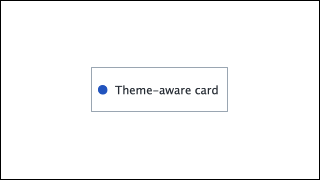 Light theme
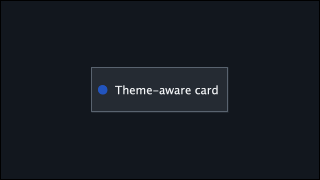 Dark theme
Two views of the same content, not consecutive frames.
5.1 Categories and scales
For categorical data, choose a stable data order and use (series-color 0), (series-color 1), and so on. Resolution uses the selected theme’s immutable categorical series with explicit wraparound. It never uses a mutable “next color” counter.
For scalar data, use sequential-color-scale or diverging-color-scale. Their minimum, maximum, meaningful midpoint, missing-data color, interpolation space, and out-of-range policy are all authored values. A theme may change the swatches, but it does not reverse the meaning of low and high values.
The palette-sheet example keeps the role names and series order while the selected theme changes the rendered colors. Its complete source is "examples/colors/palette-sheet.rkt".
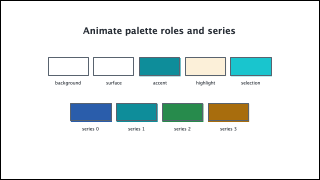 Light theme
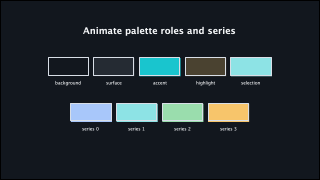 Dark theme
Two views of the same content, not consecutive frames.
5.2 Inspecting a result
The preview’s Colors and theme inspector section lists palette groups, fixed endpoints, semantic roles, and categorical-series entries. Select a row to copy either its token expression or its resolved literal hexadecimal value. The literal action is explicitly labelled non-themeable.
(inspect-color (color-mix theme-accent gold-b 1/2 #:space 'oklab) animate-dark-theme #:owner-path '(world card) #:style-field 'fill)
The returned immutable report records the authored datum, resolution chain, resolved RGBA and hexadecimal value, alpha, theme fingerprint, interpolation choice, and optional owner path. It explains a color decision without sampling pixels or changing the Scene.