3 A recipe for package docs
Scribble can do a great deal, and its own documentation covers all of it. This section is the short version: the handful of forms you need to document the modules in a typical package, in the order you’ll use them. Follow the links when you want the details.
The recipe assumes you started your package with raco pkg new mypkg. That gives you an "info.rkt" that tells raco setup to build your docs, and a starter document:
"mypkg/scribblings/mypkg.scrbl"
#lang scribble/manual @require[@for-label[mypkg racket/base]] @title{mypkg} @author{joel} @defmodule[mypkg] Package Description Here
3.1 Step 1: Require your modules for-label
The require at the top of the document uses for-label. This makes the bindings from those modules available to your docs without running any of their code. Whenever you write the name of a binding, whether in a defproc or inside racket, Scribble uses these bindings to work out which one you mean, and links the name to its documentation.
So the list should include every module whose bindings you document or mention: each of your package’s public modules, racket/base (or racket), and any other libraries you refer to. Names from a module you leave out still appear in your docs, but without links. See Racket Typesetting and Hyperlinks for more.
3.2 Step 2: Start a section for each module
Give each module that users can require its own section, starting with defmodule:
@section{Rendering} @defmodule[mypkg/render] Functions for turning widgets into HTML.
The defmodule form shows readers the require line for the module. It also declares that the bindings documented in the rest of the section are the ones exported by that module, which is how Scribble connects your docs to the right bindings. Subsections inherit the declaration, so you can split a module’s docs into as many subsections as you like.
If your package has just one module, the defmodule at the top of the starter document is all you need. See Documenting Modules for the options.
3.3 Step 3: Document functions with defproc
Inside the module’s section, document each function with defproc:
@defproc[(make-widget [name string?] [size exact-positive-integer? 10] [#:color color string? "blue"]) widget?]{ Returns a new widget called @racket[name]. The @racket[size] is in pixels.}
The first part is a sample call: the function’s name, then each argument with its contract. An optional argument adds its default value, and a keyword argument starts with its keyword. After the sample call comes the contract for the result. Scribble typesets the contracts for readers but doesn’t check them, so it’s up to you to keep them accurate.
The text in braces describes the function. When it refers to an argument, use racket, as in @racket[name], and Scribble will typeset it as an argument.
For structs, constants and parameters, use defstruct*, defthing and defparam, which work the same way. All of these are covered in Documenting Forms, Functions, Structure Types, and Values.
3.4 Step 4: Document macros with defform
Document each macro with defform:
@defform[(with-widget (id name-expr) body ...+) #:contracts ([name-expr string?])]{ Binds @racket[id] to a new widget called @racket[name-expr], then evaluates the @racket[body]s.}
Here the first part is a sample use of the form. Scribble takes the first identifier as the name of the form, and typesets the others as placeholders for the pieces a user fills in. Use #:contracts to give contracts for the pieces that are expressions. For a form with a more complicated grammar, use #:grammar, or see defform/subs.
3.5 Step 5: Build and check
Build your docs with raco setup, then check them with Dover:
Dover lists the bindings that still need docs, and can give you a stub for each one to fill in. See Quick tour for an example.
3.6 When modules re-export each other
It’s common for a package’s main module to re-export the bindings from its other public modules, so that users can (require mypkg) to get everything, or, for example, (require mypkg/render) for just those functions.
If you document render-page under (defmodule mypkg/render), it connects to its docs as exported by either module. To find the docs for render-page as exported by mypkg, Scribble follows the re-export to mypkg/render and finds the docs there. But your docs only tell readers about one of the two: the box at the top of render-page’s entry says it’s provided from mypkg/render.
To list both modules, add #:no-declare to the defmodule and declare the modules yourself with declare-exporting:
@section{Rendering} @defmodule[mypkg/render #:no-declare] @declare-exporting[mypkg/render mypkg]
The defmodule still shows the require line for mypkg/render, and the declare-exporting declares both modules. Now the box for render-page says it’s provided from mypkg/render and mypkg.
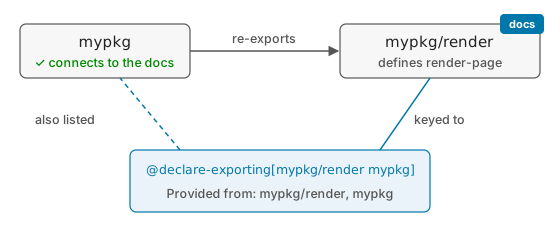
The order of the modules matters. Scribble keys your docs to the binding as exported by the first module, so list the module that defines the binding (or the one nearest to it) first. If you list mypkg first, the docs are keyed to mypkg, and render-page as exported by mypkg/render doesn’t connect to them: the binding doesn’t pass through mypkg on its way there.
3.7 When public modules share a private module
Another common pattern is to keep some code in a private module, and have more than one public module re-export its bindings. Say mypkg exports everything and mypkg/lite exports just the basics, and each gets make-widget straight from mypkg/private/widget.
If you document make-widget under (defmodule mypkg), it won’t connect to its docs as exported by mypkg/lite. To find the docs for make-widget as exported by mypkg/lite, Scribble follows its re-exports back toward the definition, looking for the module the docs are keyed to. That path goes from mypkg/lite to mypkg/private/widget, and never passes through mypkg:
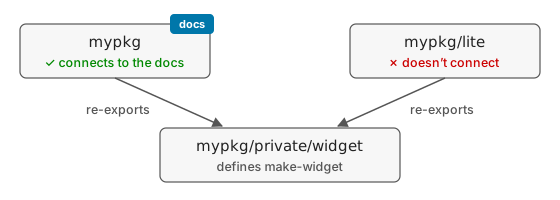
Any docs that mention make-widget as imported from mypkg/lite, including your own, end up with a broken link, and raco setup warns about an undefined tag. Dover reports it as a documentation warning.
The fix is #:use-sources, which keys the docs to the module that defines the binding:
@defmodule[mypkg #:use-sources (mypkg/private/widget)]
Every re-export leads back to the definition, so now make-widget connects to its docs as exported by any module that re-exports it:
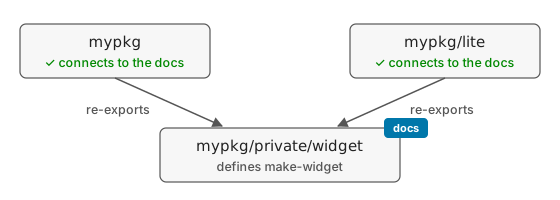
This works because the private module exports the binding under the same name the docs use. Scribble matches the modules in #:use-sources by name, so if mypkg/private/widget defined %make-widget, and each public module renamed it with rename-out, no #:use-sources could connect it. In that case, give the binding its public name in one private module, have the public modules re-export it from there, and add that module to #:use-sources.
The #:use-sources option fixes the connection; it doesn’t change which modules your docs say the binding is provided from. To list mypkg/lite there too, combine it with the approach from When modules re-export each other:
@defmodule[mypkg #:no-declare] @declare-exporting[mypkg mypkg/lite #:use-sources (mypkg/private/widget)]
Since #:use-sources decides where the docs are keyed, the order of mypkg and mypkg/lite matters less here; put the one you’d most like readers to use first. The docs for declare-exporting explain how Racket’s own docs use this for bindings like parameterize.